
Monday, 21 October 2013
0
Monday, 21 October 2013
Unknown
.png "MX Player")
.png "MoboPlayer")
.png "VPlayer")
.png "Easy Video Player")

Read More
Top 5 Free Best Android Video Player Apps
Top 5 Free Best Android Video Player Apps
Android come most popular mobile OS nowadays because it offers all great features which a mobile user demand. There are lot of Android apps available in Android market according to AppBrain currently there are 854548 Android apps in Android Market and 23% out of them are available with low quality. So finding out you desired and best app from this huge collection is very difficult job. Video player app is very important for Android users but which apps to download from Android market have same problem as we have discussed so, that's why here in this post listed Top 5 Free Best Android Video Player Apps (Download) to make your work easy to find out the best apps on Android for Your needs.
.png "MX Player")
MX Player is one of the best video player app that easily available on Android Market free of cost. It is full featured pack video player which every Android users wishes for and this is also 1st video player to support the Multi-Core Decoding.
Top Features:
- It provides very easy and simple UI.
- It supports Multi-Core Decoding.
- It can also supports Hardware Acceleration.
- Provides Kid Locking, you can easily lock the screen only to the video player, so kids can't access other settings of your Mobile.
- It best for almost all kind of popular video formats.
- Auto resume option is the most awesome feature MX player.
- Download Link: MX Player
2. MoboPlayer
.png "MoboPlayer")
Mobo Player is also one of the best video player app and its most important feature is it supports 90% of the video formats.
Top Features:
- It can play Multi-audio streams and multi-subtitles.
- It also supports HD videos.
- It can also streamed videos through RTSP, HTTP protocols.
- Offers very simple and attractive User Interference.
- Download Link: MoboPlayer
3. VPlayer
.png "VPlayer")
Large number of people use YouTube as best video watching site so VPlayer is amazing and most useful app for all those who watch YouTube Videos and the most important it provides awesome and simple GUI.
Top Features:
- It uses less battery power to play videos.
- Most important it can play YouTube videos directly from Vplayer.
- It can also use to play the Facebook videos.
- It also supports hardware acceleration.
- It can plays HD Videos without any Problems.
- It also supports almost all most famous video Formats.
- Download Link: Vplayer
- Note: Vplayer is just available for 7 days Trail
4. Easy Video Player
.png "Easy Video Player")
If you want some privacy on your videos then Easy Video Player is best choice because it lets you to have great privacy control on your videos. This amazing feature makes it different from all other video players.
Top Features:
- Most important provides privacy control on videos.
- It can supports all the popular video formats.
- Wifi transfer is enabled.
- Offers advanced video sorting.
- Download Link: Easy Video Player
5. BSPlayer

BSPlayer is best for simple video player with such awesome features. It is available in both free and paid and you can download its free version from Google Play
Top Features:
- Provides Kid Lock
- It can Plays files directly from uncompressed rar files
- Also supports hardware acceleration which is important for payback speed
- It can also supports all the popular video formats.
- Download Link: BSPlayer
Saturday, 19 October 2013
0
Saturday, 19 October 2013
Unknown

As we all see lot of new features in the iOS 7 beta version when it released and the most beautiful feature that i like in iOS 7 is its new interface with new icons and another great features like lock screen feature,notification center etc. If you are using Android Phones and you want iOS 7 interface on your Android Phone..?? If your answer is yes then you are in right place because today i searched a Android App which helps you to get iOS 7 interface on your Android Phone.

Read More

How To Get iOS7 Like Home Screen On Android Phone

How To Get iOS7 Like Home Screen On Android Phone
Main Features Of Espier Launcher iOS7 Android App:
1. iOS7-Style: It brings clarity to the entire experience:
- Perfect implementation of iOS7 home screen effects and functions.
- Prefect iOS7-style animations.
- Dynamic clock and calendar icons.
- Dynamic color of the titles and the indicators based on the shade of wallpaper.
2. A perfect combination of beautiful iOS7 style and the modern Android features:
- Flawless widget support; You can have multiple widget pages (up to eight). (You need to pay for an extra license).
- Complete shortcuts management.
3. Dozens switches or options, which help the launcher matches your Android device perfectly:
- Use widget pages or not.
- Show all widgets in one widget page or use multiple widget pages.
- Show widget pages along with icon pages or show the widget pages separately.
- Powerful customization of icon layout; You can customize the icon size, icon layout (columns and rows), the size of icon title, and the color of the title.
4. Unique multi-language support; Dozens languages supported, and more and more.
5. AppHub folder reminds you the update of your apps in time.
6. Other features or enhancements:
- Design icon by yourself; you can apply one design to a specific category of icons, not only one icon.
- Hide and/or lock icons (You need to pay for an extra license).
- Dozens of themes (more and more) available to change your icon style.
- Dozens of plugins (more and more) available to extend the functions; Badge icons if you use Espier Notifications plugin.
- You can get your favorite wallpapers and icons from Online Gallery easily.

Posted in Android, how to, smartphones
0
Unknown
Read More
How To Download Torrents on Android
How to Download Torrents on Android || Top 5 Best Ways to Download Torrents on Android
Torrents have become most famous due to the variety of content that its offers like music, videos and full HD movies and many more. We all use torrents to download full length movies, audio, videos and other files and it is best way. Most of us use computer to download Torrents but now you can easily download torrents on Android and iOS devices. To download Torrent on Android you need Apps which have listed below and how to download Torrents on Android.
1. tTorrent lite
 tTorrent Lite is a best free Torrent app to download torrents on Android devices and It offers almost all features of full Bittorrent client like Download Speed limit, Torrent Search, Wi-fi Mode, Tracking. This app provides friendly User Interface which is similar to utorrent client for PC.

Download Link: tTorrent lite
Process:

Process:

- After download tTorrent lite app then install on android device.
- From your Browser download torrent file to SD card(memory card).
- Now open tTorrent Lite app.
- Click Add torrent button and select torrent file from SD card.
- Click download and torrent file starts downloading.
- With this app you can limit download and upload speed and also use wi-fi to download speed by just clicking Option button.
2. aTorrent
.png "aTorrent") aTorrent is another best android app for downloading Torrent files. It provides almost all features which includes in BitTorrent. It also supports DHT for trackerless torrents and can load magnet links, that are now more famous.
aTorrent is another best android app for downloading Torrent files. It provides almost all features which includes in BitTorrent. It also supports DHT for trackerless torrents and can load magnet links, that are now more famous.
.png "aTorrent")
Download Link: aTorrent
Process:

Process:

- Download aTorrent app and install on Android mobile.
- Now open browser and download torrent link.
- Now open the aTorrent app and add torrent.
- Now click search then click on download your desired file starts downloading.
- You can also also check status download any time.
- It also provides using Wi-fi and allows to have multiple, parallel downloads so you don't need to worry about downloading multiple files at once.
3. aDownloader
 aDownloader is also another best app to download torrents on android smartphone as well tablets But most of the users who have recently tried this app have commented that it not work fine on Andoid 4.1 jelly bean.

Download Link: aDownloader
4. uTorrent App
 utorrent is also one of the best Android app to download torrent files on Android devices.

Download Link : uTorrent
5. Bit Torrent(Beta)


BitTorrent Beta is one of my favorite app to download torrents on my smartphone and it is the official BitTorrent client for Android.
Tuesday, 15 October 2013
0
Tuesday, 15 October 2013
Unknown
.jpg "How to Keep Your Private Photos/Videos Hide On Android")


Read More
How to Keep Your Private Photos/Videos Hide On Android
.jpg "How to Keep Your Private Photos/Videos Hide On Android")
How to Keep Your Private Photos/Videos Hide On Android
One of the best example of technology is Mobile phone because it has removed the distance and people can communicate with each other easily and quickly. As we all know smartphone and android is most popular discovery of mobile phone technology and nowadays it is one of the most hot topic. As smartphone is your personal device which keep your all private data like pictures, images documents and videos etc. You can make private your all data by locking your phone. Most of people want to hide their some personal photos and videos so here is an Android trick which enable to hide private photos and videos from your friends and family. As on computer you can make private folder to keep your private data, similarly you can do that on your smartphone. So in this article you will learn How to Keep Your Private Photos/Videos Hide On Android smartphone. Keep safe is an app which will protect your private data and hide it from others.So follow below steps to protect your private data hidden from others.
How to Keep Your Private Photos/Videos Hide On Android?
How to Keep Your Private Photos/Videos Hide On Android?
1. Install And Set Pin

3. Now you will be asked to enter your protection pin after completion of installation.
4. Enter your 4 digit password to hide your private data then click ‘OK’ and enter the pin again for verification.

5. You will be redirected to a page where you can allow a pin reminder if you forget it.
6. Now enter your email address to activate the email remainder.
7. If you don't want to enable pin reminder then click on ‘No, Thanks’ to disable it.
Hide Photos And Videos With KeepSafe:
1. Now you can use “keepsafe” app to hide your personal data like photos, videos.
2. In your android phone go to “gallery”.
3. Now choose any photo or video, then click on the ‘Share’ button. From the selection, select ‘Keep safe’.

4. This is where you can add images and videos to hide them and make them private.No one can access them without entering the Password.
5. If you want to see these private protected file open “keepSafe” app and enter your pin.
Unhide Photos And Videos:
You can also unhide, hide photos and videos.To unhide your photos or videos follow below steps.
1. Open your KeepSafe Gallery on smartphone.
2. Choose any photo or video you want to unhide.
3. long-press the item until a pop-up window appears with options, then click on ‘unhide’.When you click on “unhide” private pictures and videos will be shown to everyone.
Sunday, 13 October 2013
0
Sunday, 13 October 2013
Unknown




.png "PhotoStitch Lite")


Read More
Top 10 Useful free Android Apps For Web Designers
Top 10 Useful free Android Apps For Web Designers
Web designers always want easiest and most useful tools for their webs and if you are Android user then this work become easy How? its ans very simple because Android offers lot of apps for web designers to ease their work like here in this post have listed Top 10 Useful free Android Apps For Web Designers so if you are using an Android device then you can always make use of different tools that will make website designing a lot easier and most important thing is that most of the apps mentioned below list cost you nothing because they are free. As Some of them also come with paid versions that you can try before making a purchase.

This is most useful tool for web designers which makes it easier to pick different colors for their websites. As it uses a sliding mechanism, you can conveniently pick a color according to your requirements. There are seven different modes to use this app as you can mix colors per your liking. It also allows you to work with four different color models, including HSL, HSV, RGB and YUV. It presents color in hex or decimal, and keeps you from downloading anything to use it on your website.
2. Photoshop
Whenever you want to use images on your site then you have to edit them for further so to solve your this photo editing problem with the help of this particular app. If you already working on Photoshop then you will find it easy to work on this little awesome app. It edits photos on Android phones and the interesting thing is that once you have finished editing your images, you can save them or upload them from your device, it is also possible to upload them on another device.

If you are coder then you should consider making use of this app because it allows to write new code in a HTML editor with find programming getting a bit easier, it makes it possible to create the code and then save or email it for use. It also has a paid version that will make it possible to write CSS, JavaScript and PHP. With its syntax highlighting features, it becomes easier to write and use your code.
As many of us need an icon creator so you can use this app for this one purpose. This amazing app allows to create icons with just text. It is quite easy-to-use, as you just need to type in the text and use the button to create a widget/icon. It is possible to change the font and settings to make the text look impressive. You don’t have to go through any hassle to add or remove colors and effects.
5. Flickroid

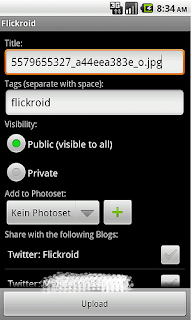
When you work on the Flickr website, you always look for something to upload your images and videos from your android device, that’s when you can opt for this particular app. You can use its background-uploading feature to continue work on your device while sending your files to your Flickr account and modify its privacy settings and change image tags as per your requirements. It also allows you to change, upload, and download different images at the same time.
.png "PhotoStitch Lite")
If you are looking for a useful app to create impressive graphics then you should try this app, as it allows to create uniquely designed images for your website. You have to take images of an object from different angles and then upload them on to the app – it will take care of the rest. By joining them all together, it will provide you with a multi-dimensional image to use on your website.
7. Color Pal

It is another particular tool which allows to play with different colors. Web designers are aware of the fact that they can easily use hexadecimal to select different colors, but this app help them to check different color palettes before finalizing the colors for the website.
This is a good app for those who like to design websites while playing with PHP code. You will find a variety of PHP code on this app, which makes it a popular choice for many web designers. It is easy to use and has everything categorized perfectly well.
9. Typography & Font
You can't complete your website unless you have added the text, and that’s why this app will come in handy. You can use this particular app to create a diverse range of fancy fonts as well as typefaces. This is a simple way of showing your creative side to the world. It allows you design graphics, text, and borders to make your website look impressive.
10. CSS Reference
When using CSS code, you will always need some help. That’s when this code will lend a helping hand. With chunks of CSS code loaded on it, this app is going to show you the CSS code you need to complete your design project. It works more as a reference app where you will find answer to your programming related questions. In other words, this particular app is going to serve as an alternative to your programming books.
Sunday, 22 September 2013
0
Sunday, 22 September 2013
Unknown

Read More
Best Web Browsers for Your Android Device

Best Web Browsers for Your Android Device
Android, the mobile operating system by Google is so popular today. One reason for its popularity is the availability of tons of free applications for Android. One such important application that you should choose correctly is the browser. The browser connects you to the World Wide Web; a software application that is used to surf and navigate the internet. There are many browsers available for you to choose from, but deciding the right browser becomes difficult sometimes, because of different requirements of different people.We have compiled a list of 5 best browsers to help you choose the right browser to use with your Android device. See the features and choose for yourself :
1. Firefox
A free browser that will save you time as the speed of this browser is impeccable. It has undergone a major update and has become one of the favourite browsers of Android users. Firefox has redeemed itself with this major update and has trounced the competition. In fact, according to Google, Firefox is compatible with 94% of all the Android devices being used compared to just 7% of the Chrome. It works on all devices which have Android 2.2 (Froyo) or newer. So far, it has had just positive reviews and more people are switching to Firefox.
2. Chrome
Chrome’s unique features are its tab system, searches that are ‘lightning fast’, ability to sync bookmarks through Google sign in, Incognito Mode Browsing – which allows you to browse privately, voice search and scrolling navigation. Chrome for Android also boasts fast browsing as it is optimised for mobile. Definitely a must for Jelly Bean and Ice Cream Sandwich Android users, but the Chrome browser can only be used for Android 4.0 Ice Cream Sandwich and above devices.
3. Dolphin Browser
For RSS subscribers, this browser may be the cup of tea. Dolphin simplifies the web pages making it easier for you to read. It has a HD version for mobile phones and the Mini version for handheld devices. It supports more third-party plug-ins and tools that uncover more features. The Dolphin Sonar lets you open and navigate the web via on-screen gestures. Dolphin sonar also adds text-to-speech feature in Dolphin browser.
4. Opera Mobile/Mini
Opera desktop users will love the mobile and mini versions, as synching is just a snap away. Fast and free, with third-party add-ons for more improvements whether on the browser or games. Always remember that the mobile and mini versions are not the same; Opera mobile is a full browser unlike the mini, however the file size of the latter is smaller. Opera mobile also compresses the data in the background, before it is delivered to you, hence saving your bandwidth usage. For older devices Opera is the best option to go for.
5. Boat Browser/Mini
This is a fun and free browser for your device that boasts a powerful voice control feature. If you say “Facebook”, the browser will automatically open Facebook for you. There are various skins and themes that you can choose from in order to personalise your browser. The mini version of the Boat browser can be used if your device can not handle the full version.
Posted in Android
Wednesday, 18 September 2013
0
Wednesday, 18 September 2013
Anonymous
.jpg)
Technology is getting progress and touching the heights of sky.iPhone is new uprising discovery in technology. After the discovery of iPhone 4s,iPhone 5s in the market. iPhone 5s is new sparkling device with exclusie features.There is extraordinary and sparkling feature in iPhones 5s which is that it has golden wrapped off body. Gold wrapping body of iPhone is surprising feature. Till second generation 3G version,Cupertino based company has hitherto offered only white and black shade devices.Images of gold wrapping of iPhone 5s are given below.
.jpg)
iPhone 5s has sparkling feature like “sensor”.This sensor turns off the screen when a phone is become infront of face while making a call as shown in below image. Ming-Chi Kuo, is working on iphone and in his struggle to come sparkling features on the globe with expensive gold casing.Below images also show that images are composing and editing carefully so that the Apple logo and iPhone moniker at the rear are not shown.iPhone is treated with costly and real gold.
Plated with 24 Carat Gold:
iPhone 5s is plated with 24 carat with cost of $4,520.Be excited to see sparkling and costly look of iPhone 5s wrapped in gold.Surely, it will attract people by its sparkling look and with exclusive features.
Read More
Apple iPhone 5s Sparkling Device Wrapped in Gold
.jpg)
Technology is getting progress and touching the heights of sky.iPhone is new uprising discovery in technology. After the discovery of iPhone 4s,iPhone 5s in the market. iPhone 5s is new sparkling device with exclusie features.There is extraordinary and sparkling feature in iPhones 5s which is that it has golden wrapped off body. Gold wrapping body of iPhone is surprising feature. Till second generation 3G version,Cupertino based company has hitherto offered only white and black shade devices.Images of gold wrapping of iPhone 5s are given below.
.jpg)
iPhone 5s has sparkling feature like “sensor”.This sensor turns off the screen when a phone is become infront of face while making a call as shown in below image. Ming-Chi Kuo, is working on iphone and in his struggle to come sparkling features on the globe with expensive gold casing.Below images also show that images are composing and editing carefully so that the Apple logo and iPhone moniker at the rear are not shown.iPhone is treated with costly and real gold.
Plated with 24 Carat Gold:
iPhone 5s is plated with 24 carat with cost of $4,520.Be excited to see sparkling and costly look of iPhone 5s wrapped in gold.Surely, it will attract people by its sparkling look and with exclusive features.
Saturday, 24 August 2013
0
Saturday, 24 August 2013
Unknown

Lets have a look to this new features:
1. Notification Access
2. Bluetooth Smart
3. OpenGL ES 3.0
4. Restricted Profiles
5. Dial-pad Auto complete
6. Background WiFi location
7. Bluetooth AVRCP
8. Faster user-Switching
9. Easier text Input
10. Hindi Support
11. New Camera UI
Read More
Top Features in Android 4.3 Jelly Bean

Top Features in Android 4.3 Jelly Bean
Google has announced the new updated version of Android Operating system which is squeal version update version 4.3.The newly Launched Table Nexus 7 is the first device to run on Android 4.3.The new version is called Jelly Bean.This latest update comes after 9 months of when Google introduced Android 4.2. As this is Squeal Update of Android excepting so much new Features is waste.The New version Android 4.3 doesn't bring a big makeover features but comes with a few major god features.
Lets have a look to this new features:
1. Notification Access
Notification bar is the key feature of android which started with android release and got modified with each updated version.In android 4.3 you can control and interact with the new Status bar notification.This will allow user to see all notification at one place and allow user to control how notifications will be pushed.
2. Bluetooth Smart
This Feature allows device running on Android v4.3 will support low-energy Bluetooth Smart accessories.Users can synchronize the low energy devices without affecting the battery much.This feature will make a way for Android Friendly Wearable tech.
3. OpenGL ES 3.0
All the Gamer will love to have this feature in there Smartphone.This feature will let the android device render high quality graphics games and other apps.
From this feature users can restrict app usage and content consumption on their android device.Through this feature parents can control which apps and games cam their children access on their device.But this restricted feature is available for only Android based tablets.
5. Dial-pad Auto complete
This feature suggest contact names and phone numbers when user start typing something in Dial pad.Its not a new feature Samsung and HTC is already adding this feature in their devices UI skin running on Android.Now this update will add this feature to all Android based devices.
6. Background WiFi location
By this Feature Google has increased the location accuracy of Android Device by allowing locution scanning through Wi-Fi. This will allow the apps to get the location data through Wi-Fi also it will give location information whether it is set to off and not using the data access then also.
7. Bluetooth AVRCP
The device powered by Android 4.3 now can connect with Bluetooth enabled car stereos.Bluetooth AVRCP 1.3v allows stereos to display data such as song names from an android 4.3 device.
8. Faster user-Switching
The new Version supports Faster user Switching From the lock screen only in the case of multiple users.
9. Easier text Input
The new Android 4.3 Comes with upgraded recognition for tap-typing that makes text input more easier and faster while chatting and other typing work on the device.The version also brings a new emoji keyboard, which iOS was using previously.
10. Hindi Support
Google has introduced native local language support to its operating system for Africaans, Amharic, Hindi, Swahili and Zulu. Hindi has finally reached the stock Android operating platform. With the update, Google has also added support for Hebrew and Arabic (right-to-left) in the home screen, Settings, Phone, People, and Keep apps.
11. New Camera UI
Android 4.3 has a new updated Camera UI which gives you a new arch based menu which make easier to have control on camera settings.
Posted in Android
Thursday, 22 August 2013
0
Thursday, 22 August 2013
Unknown

Read More
Android 5.0 Key Lime Pie: The latest Android version

Android 5.0 Key Lime Pie: The latest Android version
Some days Ago only Google launched update version of Android named as Android v4.3 Jelly Bean which is the current latest version of android.But as it was a just squeal update Everyone has accepted a new version but not to worry according to some source reports Android 5.0 Key Lime pie is coming soon release date is excepted to be in October 2013 and this will be a major upgrade for all android users.As this new version is not official so we are not sure that it will be called Key lime pie or something else.But it is fixed that its name will something with a dessert name with letter 'K'.
According the some rumors Android 5.0 Key lime Pie will support devices like Nexus 5, Nexus 4, Nexus 7. Other than Nexus devices it will support the Samsung devices like Galaxy S4, S3, Note 2, Note 10.1 and also some other popular devices like Xperia Z, Xperia SP, Xperia V and Tab Z. And HTC J and HTC T6 Will also in Key lime Pie Device running list.
The Nexus 7 and Nexus 4 device has already spotted running for testing with build number KRS368 and KRS365, respectively which shows Google is already doing testing with its new version.The Build numbers starting from 'K' clearly shows that the new version which is Google testing is Key Lime pie of any other name but starting with 'K' only.You can see the previous builds of android Like Gingerbread build starting with 'G', Ice Cream Sandwich build device number starting with 'I', latest launched Jelly Bean starting with letter 'J'. Hence this means the Version which Google is testing on these two nexus device must the new version starting with letter 'K' or might be named as Key Lime Pie.
According to Technical Specifications Android 5.0 is going to run on Linux Kernel 3.8 with some changes to support devices with 512 RAM.The New Upgraded OS will be launched with new Multiple Device Support with Cross device SMS synchronize with Google Cloud Service.Some of the Features of Android 4.3 Jelly Bean like Project Butter, OpenGL ES 3.0, Low Energy Bluetooth are going to be Transfer into Android 5.0 also.Android 5.0 Key Lime Pie expected release date somewhere in October or November.
Posted in Android
0
Unknown

Steps to Install Flash Player in your Android device :
1. Download the latest version available on the website.
Read More
How To Install Flash Player on your Android device?
How To Install Flash Player on your Android device?
Adobe announced Flash Player for Android many time ago only.Flash Player necessary for the peoples who visit the websites containing Flash Contents.Without Flash Player you will face many difficulties to views websites with Flash Contents. So here we will discuss how to install flash player in you Android device.Adobe Flash Player is no longer available to Google Play Store.So for that you have to get it from Adobe official Website(links are given Below).
Steps to Install Flash Player in your Android device :
1. Download the latest version available on the website.
2. Then allow the phone to install apps from unknown source.
3. Go to Downloads where the Flash player downloaded is present.
4. Click on the file to automatically install flash Player.
To navigate we recommend you to install Mozilla Firefox for android, because its a plugin-capable browser and it will allow to you to views most of the flash contents. Now you have successfully installed flash player but to optimize performance and avoid compatibility error, we recommend you to set your Firefox browser to activate playback flash only when you click on the elements. you have to press menu then go to settings and you will be with plugins settings.
Wednesday, 21 August 2013
0
Wednesday, 21 August 2013
Unknown

Things Needed:
4. A good Free Space in your SD card on Phone Memory.
Procedure to Run more than one WhatsApp account on your Android Device:
Note: First of All Install SwitchMe app and after that follow the below Steps
Do the Following in SwitchMe app:
Read More
How To Run More Than One WhatsApp Account On Your Android Device?

How To Run More Than One WhatsApp Account On Your Android Device?
WhatsApp a instant messaging app which the most famous instant chatting client on almost all mobile platforms. Other than instant Chatting Whatsapp gives its user many features like file sharing like images,videos,etc. And by Offering so much useful features WhatsApp becomes very famous in a very short period. WhatsApp craze can be understand by seeing the figures by WhatsApp only which tells us that WhatsApp Holds 200 million + monthly active users. According to a report issued, it send more than 20 million messages per day, that is approximately double the message carried out by Facebook. Whats App is so popular nowadays that most Smartphones Coming are preloaded with WhatsApp. So, now Coming back to the Topic "How to run more than One WhatsApp account on you android device". It's very easy for Dual Sim mobile Users, but if you don't have duos android device.So we gonna discuss about our Topic.
Things Needed:
1. Rooted Android Device (Be sure your device is rooted otherwise this trick won't work)
2. SwitchMe Multiple Accounts App for your Android Device.(Download link)
3. Installed WhatsApp on you device4. A good Free Space in your SD card on Phone Memory.
Procedure to Run more than one WhatsApp account on your Android Device:
Note: First of All Install SwitchMe app and after that follow the below Steps
1. Run the SwitchMe app and create two different profile to run two different accounts of WhatsApp. These two profiles will have their own different different system settings, Apps and Data.
2. The First user Profile created by user will work as an Administrator by default and this Profile will contain all the Apps,settings and data which you are having currently on your device.This Profile Will Contain your First WhatsApp Account.
3. The Second Profile is Virtual and new, and this Profile will have it's own Settings, Apps and Data. Host your Site on HostGator
Do the Following in SwitchMe app:
Switch to this account—> Set up your phone for this account And Then —>Open Play Store—> Install/Download WhatsApp. Now, register WhatsApp for your second SIM in this profile.
Finally Done !!!! Now You are Running Successfully Running More than one WhatsApp Account on your Android
Note: Perform at your own risk neither the Writer nor the developer is responsible for anything wrong happens.The Trick is Working fine on my Android Device.
Subscribe to:
Posts (Atom)


